Smart Home Office Automation: A Practical Design Guide
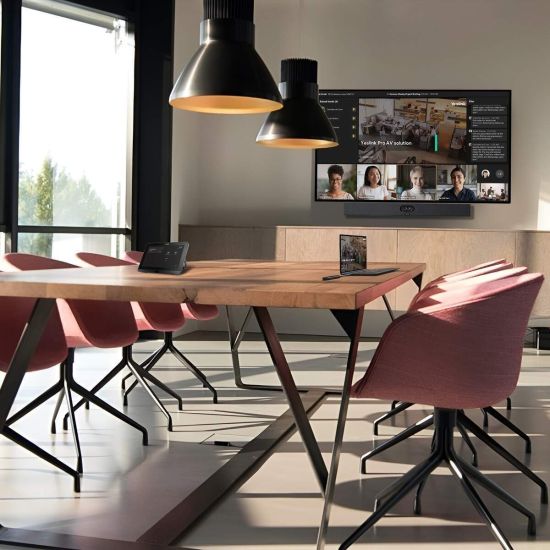
Hybrid and remote working have made the home office a permanent fixture rather than a spare-room afterthought, yet most home offices are still fitted out with a desk, a lamp and a Wi-Fi extender. A properly automated home office does considerably more: it controls lighting for both comfort and video calls, manages acoustics, keeps a stable network connection, and separates “work mode” from the rest of the house without a single extra switch to think about.
This guide covers what actually makes a difference in a home office, based on the same principles we apply to whole-home automation projects — not a list of gadgets, but a system that works quietly in the background every working day.
Why home offices need their own automation thinking
A living room lighting scene is designed to look good in the evening. A home office needs something different: consistent, glare-free light through the working day, good colour rendering for video calls, and the flexibility to shift into a relaxed evening mode once work stops. Treating a home office as “just another room” on the general lighting plan usually produces a space that’s either too bright and clinical or too dim to work in properly — automation is what lets one room serve two very different purposes well.
Lighting: the single biggest factor in a usable home office
Colour temperature and consistency. Cooler, brighter light (around 4000–5000K) supports focus and alertness during working hours, while a warmer, dimmer setting in the evening signals the room is no longer “at work”. A tunable lighting circuit — the same technology used in circadian lighting design — automatically shifts colour temperature through the day rather than requiring manual adjustment.
Glare and screen reflection. Position and control matter more than raw brightness. Indirect or diffused fittings, combined with motorised blinds that respond to sun position, avoid the harsh reflections and squinting that come from a desk facing an uncontrolled window.
Video call lighting. A dedicated “call” scene — even lighting on the face, no strong backlight from a window, a flattering colour temperature — makes a genuine difference to how someone appears on camera, and can be triggered automatically when a calendar shows a meeting or manually from a keypad by the desk.
Acoustics: often overlooked, rarely optional
Home offices are frequently converted bedrooms or box rooms with hard floors and bare walls — acoustically the worst possible combination for video calls and concentration. Acoustic treatment doesn’t need to look institutional: upholstered wall panels, heavier curtains, a rug, and bookshelves all reduce reverberation and echo, and can be specified to match the room’s interior design rather than looking bolted on.
For rooms doubling as a media room or overlooking noisy areas of the house, additional sound isolation — solid-core doors, acoustic seals, or secondary glazing — is worth discussing with your integrator alongside the wider system design.
Network and connectivity: the invisible foundation
A home office lives or dies on connection quality, and a single Wi-Fi router at the other end of the house is rarely enough for reliable video calls. A properly designed home network uses wired backhaul to access points positioned for full-strength coverage in the office, with the office’s devices — laptop, webcam, VoIP handset — prioritised on the network so a call doesn’t degrade because someone elsewhere in the house is streaming. See our premium home networking guide for how this is typically specified.
Climate and comfort
Sitting at a desk for eight hours makes small temperature differences far more noticeable than they are elsewhere in the house. A dedicated heating zone for the home office — rather than sharing a zone with an adjoining room — allows the temperature to be set independently and scheduled around actual working hours, avoiding a cold start each morning or an overheated afternoon.
“Work mode”: one scene, several systems
The most useful automation in a home office isn’t any single device — it’s a single scene that coordinates several systems together. A typical “work mode” scene, triggered from a keypad or automatically at a scheduled time, might:
- Bring lighting to a consistent, glare-free working level
- Lower blinds partially to control screen reflection without blocking the room
- Set heating to the working-hours temperature
- Mute or redirect any whole-home audio from playing in that room
- Prioritise network bandwidth to the office
At the end of the working day, an “end of work” scene reverses all of this — dimming lighting, restoring blinds, and returning the room to a normal living space if it’s used for other purposes in the evening.
Retrofit vs new-build home offices
In an existing room being converted to a home office, most of this is achievable without major building work: wireless lighting control (such as Lutron RadioRA 3), a repositioned access point, and acoustic soft furnishings cover the majority of the improvement. In a new build or major renovation, cabling for a dedicated network drop, wired lighting circuits and acoustic treatment built into the wall build-up can all be planned in from first-fix, at a fraction of the cost and disruption of retrofitting later.
Frequently asked questions
What lighting is best for a home office? A tunable circuit that runs cooler and brighter during working hours and warmer and dimmer in the evening, positioned to avoid glare on the screen and reflections behind the person on video calls, generally performs best. Fixed, single-temperature lighting is workable but requires more manual adjustment through the day.
Do I need a dedicated network connection for a home office? For reliable video calls, yes — a wired connection to a nearby access point, with the office prioritised for bandwidth, is significantly more reliable than relying on Wi-Fi from a router elsewhere in the house, particularly in larger or older properties with thick walls.
Can home office automation be retrofitted into an existing room? Yes. Wireless lighting control, repositioned access points and acoustic soft furnishings can all be added to an existing room without major building work. A new-build or renovation project allows more of this to be wired in from first-fix, which is more cost-effective if the opportunity exists.
How much does a smart home office setup cost? Costs vary considerably depending on scope, but a single well-specified office with tunable lighting, network prioritisation and a dedicated heating zone typically sits within the same per-room ranges as other single-room automation projects — see our smart home cost guide for a fuller breakdown.
Does a home office need to be part of the whole-home system, or can it be standalone? It can be either, but integrating it into the same platform as the rest of the house means the office’s lighting, heating and blinds can be controlled from the same app and keypads as everywhere else, and “work mode” can be triggered alongside whole-home automations like an away scene or morning routine.
Design a home office that works every day
If you’re planning a new home office as part of a renovation or new build, we can design lighting, acoustics, networking and climate control as one coordinated system rather than a collection of separate purchases. Explore our smart home automation services or get in touch to discuss your space.